


This page is intended to help you understand Flexmls media options and ARMLS media rules.
TYPES OF MEDIA ON A LISTING
Listings can include various types of media to enhance their quality. Media such as photos, videos, virtual tours and documents provide visual appeal and help convey important details to potential buyers.
PHOTOS

A still image captured by a camera.
FLOOR PLANS

A bird’s-eye view diagram of a property’s layout. It often contains room dimensions or furniture placement.
DOCUMENTS

A written piece of recorded information. May be an addendum, disclosure or other supporting file.
VIDEOS & VIRTUAL TOURS

Video – A moving visual image.
Virtual Tour – A moving slideshow of still images. May be a “virtual walkthrough”, allowing you to select a space to view from a 360-degree image.
MEDIA FILES & DESCRIPTION LIMITATIONS
PHOTOS
15 MB or 2000 x 3000 limit
JPG, JPEG, GIF, PNG, TIF, TIFF, BMP, PGM, PBM and PPM file types are accepted.
40-character max on photo title.
1000-character max on photo description.
FLOOR PLANS
15 MB or 2000 x 3000 limit
JPG, JPEG, GIF, PNG, TIF, TIFF, BMP, PGM, PBM and PPM file types are accepted.
1000-character max on floor plan description
DOCUMENTS
10 MB limit
A PDF file type is accepted.
40-character max on custom document descriptions
VIDEOS & VIRTUAL TOURS
VIDEOS – Added as an embedded code. Most video hosting sites have an embed code in the “share” option of the video. It usually begins and ends with “iframe”.
VIRTUAL TOURS – Added as a link (URL).
TO ADD MEDIA TO YOUR LISTINGS
1. Visit the main Flexmls Menu to select Change Listing
2. Select your listing or enter the MLS number
3. Choose the type of media you want to add
PHOTOS
A still image captured by a camera.
15 MB or 2000 x 3000 limit
JPG, JPEG, GIF, PNG, TIF, TIFF, BMP, PGM, PBM and PPM file types are accepted.
40-character max on photo title.
1000-character max on photo description.
FLOOR PLANS
A bird’s-eye view diagram of a property’s layout. It often contains room dimensions or furniture placement.
15 MB or 2000 x 3000 limit
JPG, JPEG, GIF, PNG, TIF, TIFF, BMP, PGM, PBM and PPM file types are accepted.
1000-character max on floor plan description
DOCUMENTS
A written piece of recorded information. May be an addendum, disclosure or other supporting file.
10 MB limit
A PDF file type is accepted.
40-character max on custom document descriptions
VIDEOS & VIRTUAL TOURS
Video – A moving visual image.
Virtual Tour – A moving slideshow of still images. May be a “virtual walkthrough”, allowing you to select a space to view from a 360-degree image.
VIDEOS – Added as an embedded code. Most video hosting sites have an embed code in the “share” option of the video. It usually begins and ends with “iframe”.
VIRTUAL TOURS – Added as a link (URL).
PHOTO VISIBILITY OPTIONS
PUBLIC

Visible in ARMLS and can be opted in to public listing displays on the web, including: syndication options, IDXs, and other data feeds.
PRIVATE WHILE OFF-MARKET

While a listing is on-market, its media is visible in ARMLS and can be included in public listing displays on the web. Once the listing is off-market, the media automatically becomes visible only within ARMLS.
PRIVATE

Visible only in ARMLS regardless of listing status.
CHANGE VISIBILITY - DOCUMENTS, VIDEOS OR VIRTUAL TOURS
- Edit your active or incomplete listing
- Select either Documents or Videos and Virtual Tours under Media
- Add or Edit your Media
- To Add: Select either Add Document, Add Video or Add Virtual Tour
- To Edit: Select the three dots to the right of the document, video or virtual tour you want to modify
- Click Edit
- Select the radio button for either Public, Private, or Private While Off-Market
- Note: Documents can only be made Public or Private.
CHANGE VISIBILITY - PHOTOS & FLOOR PLANS
1. Edit your active or incomplete listing
2. Select either Photos or Floor Plans under Media
3. Select the checkbox in the upper right corner of each photo you want to modify
4. At the top, select either Mark Public, Mark Private, or Mark Private While Off Market
PHOTO DO'S & DONT'S
ARMLS Rule 8.23 defines what is and isn’t allowed on media attached to a listing in the MLS system. The rule prohibits contact information and branding (including phone numbers, email, individual names, websites, entity names or advertising of any kind) on media. To improve the quality of media the new rule change applies to watermarks, certain text on photographs and people in media to better align with fair housing regulations.
Click on the Accordion below to expand and view examples of what IS allowed, and what IS NOT allowed.
EXAMPLES OF WHAT IS ALLOWED FOR PHOTOS
✔️ OBSTRUCTED CONTACT INFORMATION

This image contains a yard sign with illegible contact information that has been obstructed (blurred).
✔️ VIRTUALLY STAGED
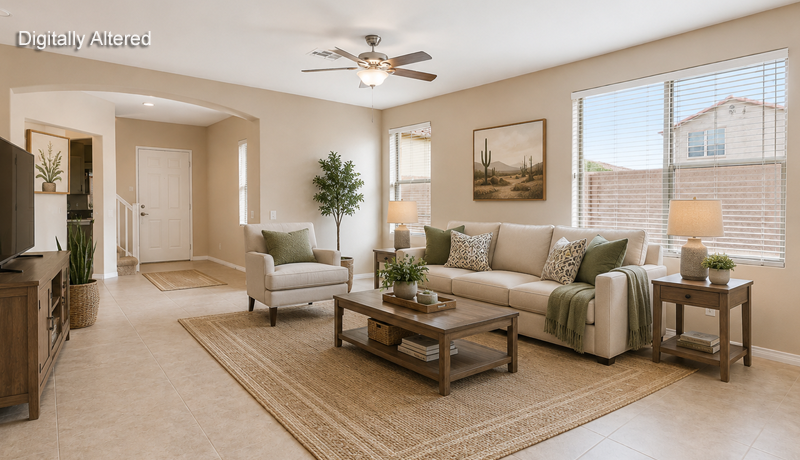
This image contains a digitally altered virtually staged living area which requires a digitally altered watermark (added in Flexmls)
✔️ CONDO/APT NAME SIGNS

This image contains a sign with the name of a specific condominium complex.
✔️ LOCATION ATTRIBUTES

This image contains a location marker for the unit, as well as the unit number.
✔️ PORTRAITS WITH PEOPLE

This image contains a living area with framed portraits of people in the background.
✔️ LOCATION ATTRIBUTES

This image contains a top view of the complex with the mailboxes clearly labeled.
EXAMPLES OF WHAT IS NOT ALLOWED FOR PHOTOS
❌ VISIBLE CONTACT INFORMATION

The image contains the listing agent’s contact information which must be removed or obstructed.
❌ WATERMARKS (NOT ARMLS-APPROVED)

The image contains a watermark that is not approved by ARMLS.
❌ TEXT OVERLAY

The image contains text stating “Solar Owned”.
❌ TEXT OVERLAY & PEOPLE

The image includes text referencing a pickleball club and displays people in the foreground, which is not permitted in listing media.
❌ PEOPLE IN FOREGROUND

The image contains an intended isolated bathroom photo, but the photographer captured themselves in the mirror.
❌PEOPLE IN FOREGROUND

The image contains people posed in the foreground.
CUBICASA FLOORPLANS
CubiCasa is a mobile app that produces floor plans from a simple five-minute scan of a property. The app requires little training and no extra equipment; it will work with almost any smartphone or tablet you already own.


PREFERRED PHOTOGRAPHER PROGRAM
The ARMLS Preferred Photographer Program connects agents and photographers. Photographers in the program have been trained, tested on ARMLS media rules, have limited access to Flexmls to add media (using their own login), and offer their own rates and services.

MEDIA FAQS
Can I list a property without photos?
Yes, but you must add at least one front exterior photo within four days of it going Active. This rule (Rule 8.24) only applies to Residential and Residential Rental (Property Classes 1 & 2) listings.
Are photos needed in a “Coming Soon” status?
No, listings in a Coming Soon status do not require a photo. But once the listing is Active, at least one front exterior photo needs to be added within four days.
Does the main/first photo need to be the front of the house?
No. The front exterior photo does not need to be the main/primary photo, nor the first photo in the list, but it must be included within four days.
Can I copy photos or other media?
If it was your listing, and you’re still with the same brokerage, absolutely. If not, you can only do so with permission.
Can my contact information be placed inside my listing’s media?
Do I have to remove the For Sale sign before taking photos of the front of the house?
The sign can be present if all contact information is blurred out or obstructed (otherwise not visible).
What does “Contact Info in the Media” mean?
This refers to anything in listing photos, videos or documents that can identify the seller’s agent or broker. Read this blog for more information.
Am I allowed to alter photos of the house?
No. Photos and other media may not be altered to add text or images, except when identifying the property’s location. Watermarks of any kind are also not allowed, unless they are provided by ARMLS and used according to ARMLS guidelines.
Can text be added to photos?
Photographs and other Media may not be altered to display text or images except to identify the property’s location attributions.
Am I able to change or remove photos once added to a listing?
You can add, remove or change the order of your photos any time while the listing is Active.
Are floor plans allowed in the photo section of a listing?
Yes. Although Floor Plans have their own section, they can be added to the Photos area if it does not include contact info or violate other rules.
Can I remove the photos once the listing goes off-market?
Only one front exterior photo needs to remain. Others can be removed before the listing closes.
If the home is to-be-built, can I add a rendering of the home in the photo section of a listing?
Yes, if a home is to-be-built, you can add a rendering of the home, but it may not contain any contact info or violate other rules. (Bonus, for to-be-built listings, the rendering will satisfy the rule of one front exterior photo within four days of it going Active.)
Are floor plans allowed in the photo section of a listing?
Yes. Although Floor Plans have their own section, they can be added to the Photos area if it does not include contact info or violate other rules.
SUBMIT A PHOTO
Want some extra clarification? Submit your photo for Data Integrity’s approval.