


This is the Part 3 in a three-part series about Reverse Prospecting. Read Part 1 here and Part 2 here.
Reverse Prospecting is a tool that helps listing agents find buyer’s agents whose clients might be interested in their listings. As a buyer’s agent, this means that if you enable Reverse Prospecting for one of your clients, listing agents who run Reverse Prospecting on their own listings will have the ability to reach out to you when the system thinks their listing is a good match for your buyer’s search. Reverse Prospecting is an opt in system, so your participation is optional.
How to Enable Reverse Prospecting For All Future Clients
Visit the main Flexmls Menu to select General Preferences. Go to the Contacts section to choose Yes as the Default for Enable Reverse Prospect checkbox on Add Contact. This will enable Reverse Prospecting on any future contacts you create.
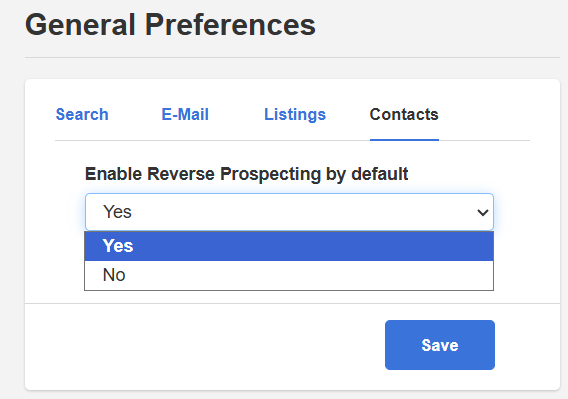
To enable it on only specific contacts or those that already exist in Contact Management, see the below process.
How to Enable Reverse Prospecting For An Individual Client
You can turn on Reverse Prospecting for existing clients through their Contact Details screen inside Contact Management. Once this function is enabled, a listing agent may contact you on behalf of your client when their listing is a close match to your client’s search criteria.

Will Reverse Prospecting Give My Client’s Contact Info to Other Agents?
No, absolutely not. When you enable Reverse Prospecting for your clients, Flexmls does not send your client’s contact information to other agents. It simply enables your information, as a buyer’s agent, to come up in Reverse Prospecting searches run by listing agents. Reverse Prospecting connects listing agents to buyer’s agents.
Learn more about reverse prospecting in general and reverse prospecting for listing agents.

