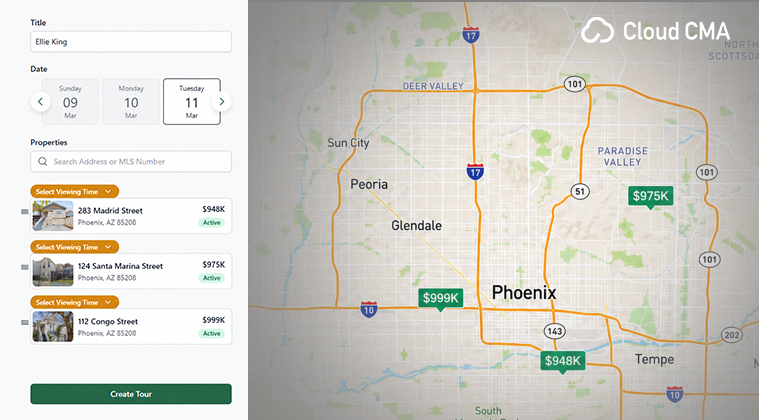
Cloud CMA offers a feature called Buyer Tour, which is a product included in your ARMLS subscriber benefits.
What is a Buyer Tour in Cloud CMA?
A Buyer Tour is a report that compiles listing data that guides your clients in making decisions when touring properties. Buyer Tours are fully customizable to meet your unique needs. Additionally, Buyer Tours allow you to gather all the necessary listing information in one convenient place.
Cloud CMA has easy-to-understand training content, but creating a Buyer Tour is fairly uncomplicated. After logging in to Cloud CMA via the Flexmls Menu, click Buyer Tour. The first step is to name the report and add MLS numbers.
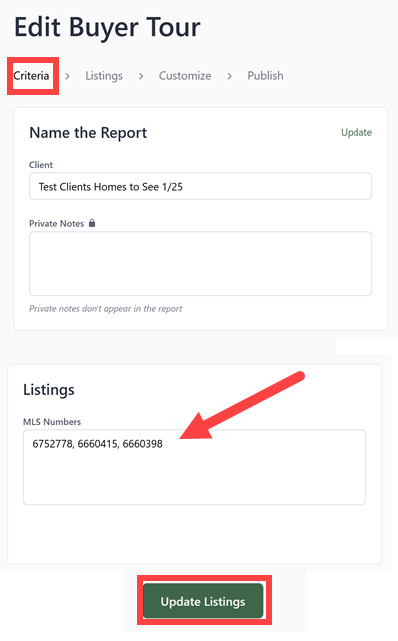
Next, organize the listings and then customize the Buyer Tour. You can add or remove pages from the Additional Content section on the left, utilize templates, personalize content, and adjust themes, layouts, or fonts to fit your style. Lastly, you can click Publish Report, and your published report will be emailed or printed as a PDF or shared as a live link.
When should I use a Buyer Tour?
Take your showing appointments to the next level! Try creating a Buyer Tour the next time you have showings scheduled. A Cloud CMA Buyer Tour stands out because it’s user-friendly and visually appealing, impressing both you and your clients.