


WHAT IS CUBICASA?
CubiCasa is a revolutionary mobile app that produces detailed and attractive floor plans from a simple five-minute scan of a home. The app requires little training and no extra equipment; it will work with almost any smartphone or tablet you already own. This versatile tool is so easy to use, it’s perfect for agents, appraisers, photographers and everyone in real estate.

GETTING STARTED WITH CUBICASA
All ARMLS subscribers now have full access to CubiCasa. It can be accessed on this special CubiCasa page!

Fast Results
Get a floor plan in five minutes by using CubiCasa’s easy-to-use floor plan app.

GLA Reports
Support your appraisal process with CubiCasa’s GLA floor plan report with calculations.

High Resolution
Create floor plans with high resolution images in JPG and PNG file formats. SVG file saving is available with an upgraded plan.

Customization
Add your own logo, wall color and floor color to your floor plans.

ARMLS Certified
Involve your ARMLS Preferred Photographers to maximize the efficiency of your business.
CUBICASA THIRD-PARTY SHARING INFO
CubiCasa Tours on Real Estate Portals
CubiCasa has partnered with major real estate portals, Realtor.com and Redfin.com, to automatically display interactive floor plans and tours on “On-Market” listings. This integration aims to improve the visibility of floor plans, creating a richer experience for potential buyers and making life easier for photographers and agents by streamlining content distribution.
How Does It Work?
The process is streamlined to ensure your property’s tour appears seamlessly on eligible listings:
- A property is scanned, and a floor plan/tour is created by CubiCasa.
- When an agent publishes a listing in the MLS, it gets distributed to these portals.
- The portals then attempts to match the CubiCasa scan address with active listings.
- If a high-confidence match is found for an “On-Market” listing, the CubiCasa-hosted floor plan/tour will appear on the listing page.
What You'll See on the Portals
You’ll see a clean, high-quality and consistent display of the floor plan in dedicated locations with the Portal’s listing display and galleries. All portals are optimizing their experiences to give this valuable content distinct and prioritized placement. If photos were uploaded to the tour by the user who performed the scan, they may be included in the embedded tour.
How To Opt-Out of Third Party Sharing
Don't Want Your Floor Plan on Portals?
You can easily opt out through your CubiCasa dashboard. You have full control over your content and can adjust your display preferences globally for your entire account or individually on a specific tour.
Single Tour Opt-Out (Individual Tours)
- Log in to your CubiCasa account.
- Go to the Order Dashboard and select the CubiCasa Tour tab for the order you want to update.
- Click Share and uncheck “Special display for real estate portals.”
Company-Level Opt-Out (All Future Tours)
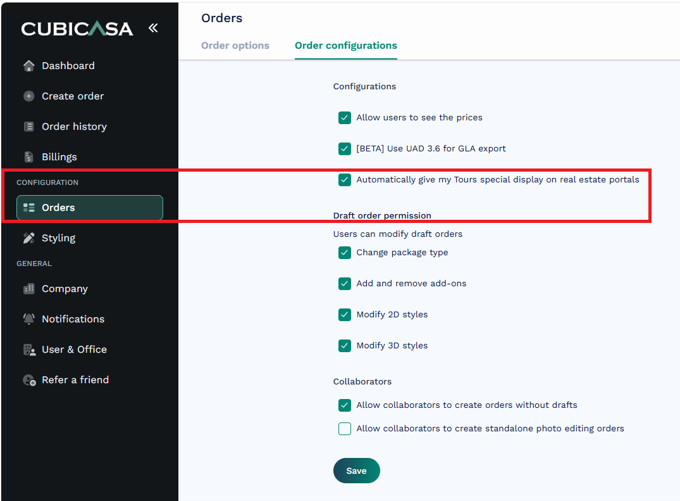
If you prefer that your floor plans and complete CubiCasa tours do not automatically display on portals by default, you can turn this feature off globally.
-
- Navigate to Configuration > Orders on the left-hand menu.
- Go to the Order configurations tab.
- Deselect the checkbox labeled “Automatically give my Tours special display on real estate portals.”
- Click Save.
CREATE A CUSTOMIZED DISCLAIMER
How to Change the Disclaimer Text
- Log in to your account on our web portal.
- Click on Styling in the menu on the left.
- Click on Create Style, or click on the three dots (⋯), then View to edit an existing style.
- Scroll down. After the color and font settings, you’ll find the Disclaimer Text field.
- Edit the text as needed by typing over the existing CubiCasa Disclaimer.
- Click Save, and you’re all set!
Watch the Video
VIDEOS TO GET YOU STARTED
Helpful How-To Videos!


DOWNLOAD THE APP


CUBICASA TRAINING
FAQ
How do I access CubiCasa?
- You can sign up for CubiCasa with this link (you must sign up using your Flexmls email address).
- You can also download the iOS / Android app.
- To access CubiCasa after you sign up, use the mobile app or visit: https://app.cubi.casa/web/login (Note: you must sign up through this link to receive ARMLS discounts).
How do I get support for CubiCasa?
How much does CubiCasa cost?
Floor plans are free, however, there are enhanced features that you can add for a fee.
Can I use CubiCasa floor plans in my listing in Flexmls?
Yes! As long as you didn’t add any extra items like watermarks, you can add a floor plan to every listing!
Can I suggest enhancements for CubiCasa?
Of course! Please send your suggestions to help@cubicasa.com.
Can I search Flexmls for listings that include CubiCasa floor plans?
Can I copy someone else's floor plans created from CubiCasa?
You need permission to use a floor plan you didn’t create.
What file types can CubiCasa floor plans be saved as?
You can export JPG, PNG and PDF file types.
How does CubiCasa calculate GLA?
The CubiCasa option that includes GLA (Gross Living Area) aligns with ANSI measuring standards. Wall thickness is calculated via an algorithm and calculation totals. This eliminates the need to measure from the exterior of the property. Fannie Mae and Freddie Mac have provided mobile and virtual requirements to make this possible, and has approved CubiCasa’s implementation to capture GLA values.
Can the opt in/out preferences of the "share floor plan program" be controlled by the broker or managing broker?
Currently, CubiCasa cannot support a broker/office-level preference for opting in/out.
How can I edit my account preferences to opt-in/out of the “share” program for all floor plans created by me?
As of July 27, 2026, CubiCasa offers an account-level (user-level) option to opt in or out of the “share” program for all floor plans created by that user. (Refer to Third-Party Sharing Info.)
What happens with my data? What about privacy?
The scan imagery is used for the purposes of generating floor plans and training CubiCasa’s machine learning models to deliver greater accuracy. CubiCasa does not distribute or commercialize the scan imagery and is aligned to the industry’s best information security practices.
For more information, please see their privacy notice. CubiCasa operates in compliance with all relevant privacy laws in the US and EU (GDPR).